HVAC business management software is the system a contractor uses to run the whole service cycle in one place: the schedule board, technician dispatch, job history per unit, estimates and approvals, invoicing and payment, maintenance agreements, and customer communication. Standalone tools handle one slice each; a management platform keeps them attached to the same job record so nothing is retyped and nothing is dropped.
Ratchly is built for the size of shop that most platforms treat as an afterthought — one owner-operator up to about ten technicians. That means setup measured in an afternoon, a phone-first technician view, flat pricing, and no implementation consultant. If you need enterprise procurement workflows and a dedicated ops team, an enterprise tool is a better fit and we'll say so.
The business is running on six systems that don't talk.
Most small HVAC shops end up with a whiteboard for the schedule, a phone for dispatch, a notepad for what the tech did, a separate accounting product for the invoice, and a text thread for the customer. Every handoff is a retype, and every retype is a chance to lose money.
- Work performed on site never makes it onto the invoice
- Approved estimates sit for a week before anyone converts them
- Maintenance agreement visits fall off the calendar until the customer calls
- Nobody can answer 'what did we do on this unit last time?' without digging
- Month-end is a reconciliation exercise instead of a report
One job record from the first call to the paid invoice.
In Ratchly the customer, the equipment, the schedule slot, the technician's notes, the photos, the estimate, the signature, the invoice and the payment all hang off the same job. When the tech finishes on site, the invoice is already written.
Schedule and dispatch
A drag-and-drop board across every tech, with drive time, skills and time windows respected.
Estimates that close on site
Build the option list on the phone, capture the signature, convert to an invoice in one tap.
Invoicing and payment
Card or ACH at the kitchen table, automatic follow-up on anything unpaid.
Customer communication
Confirmations, on-the-way texts, and review requests fire off the job status automatically.
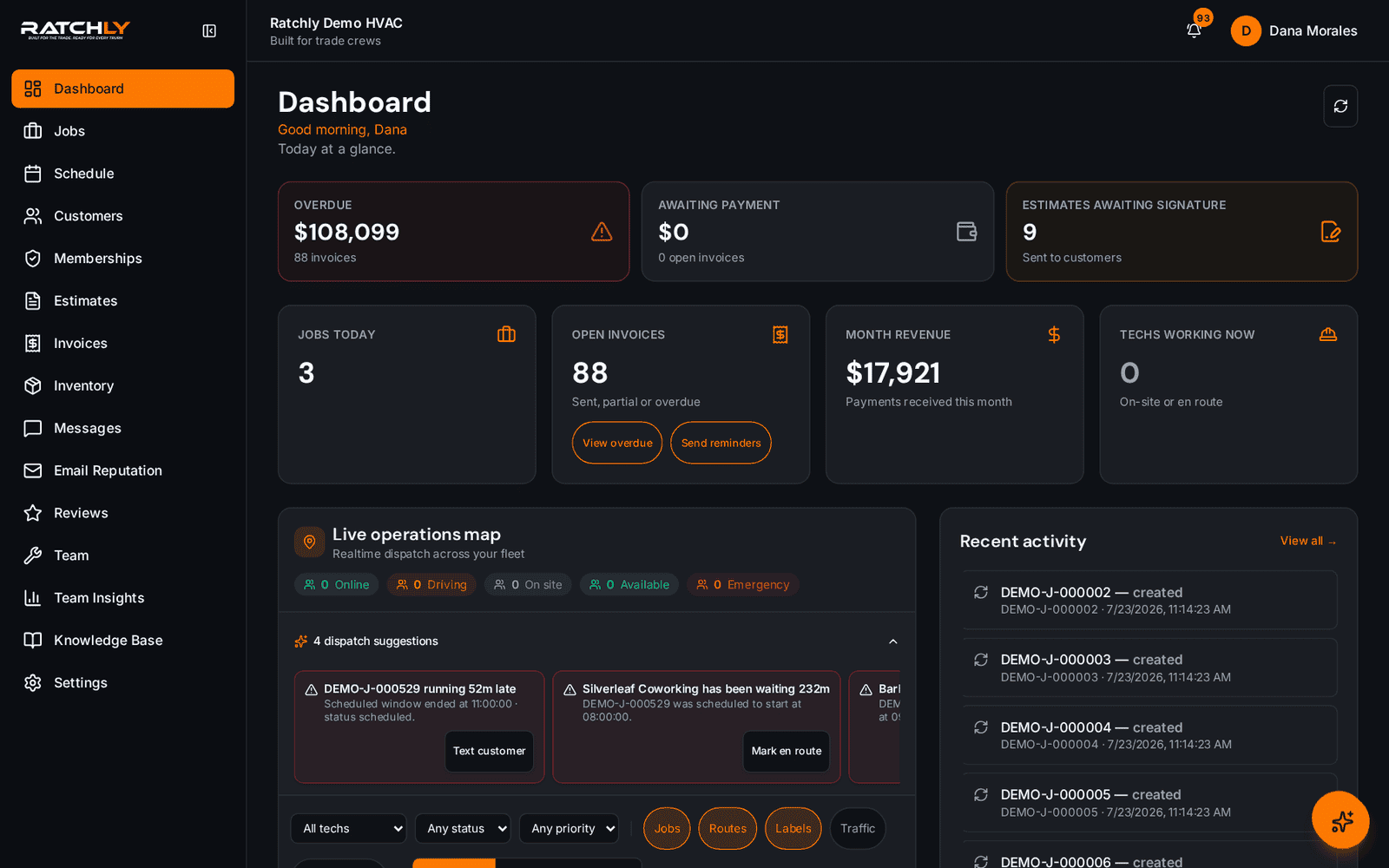
Start the day on one screen
Today's jobs, who is running behind, unsigned estimates, and the invoices that are aging — before the first truck rolls.
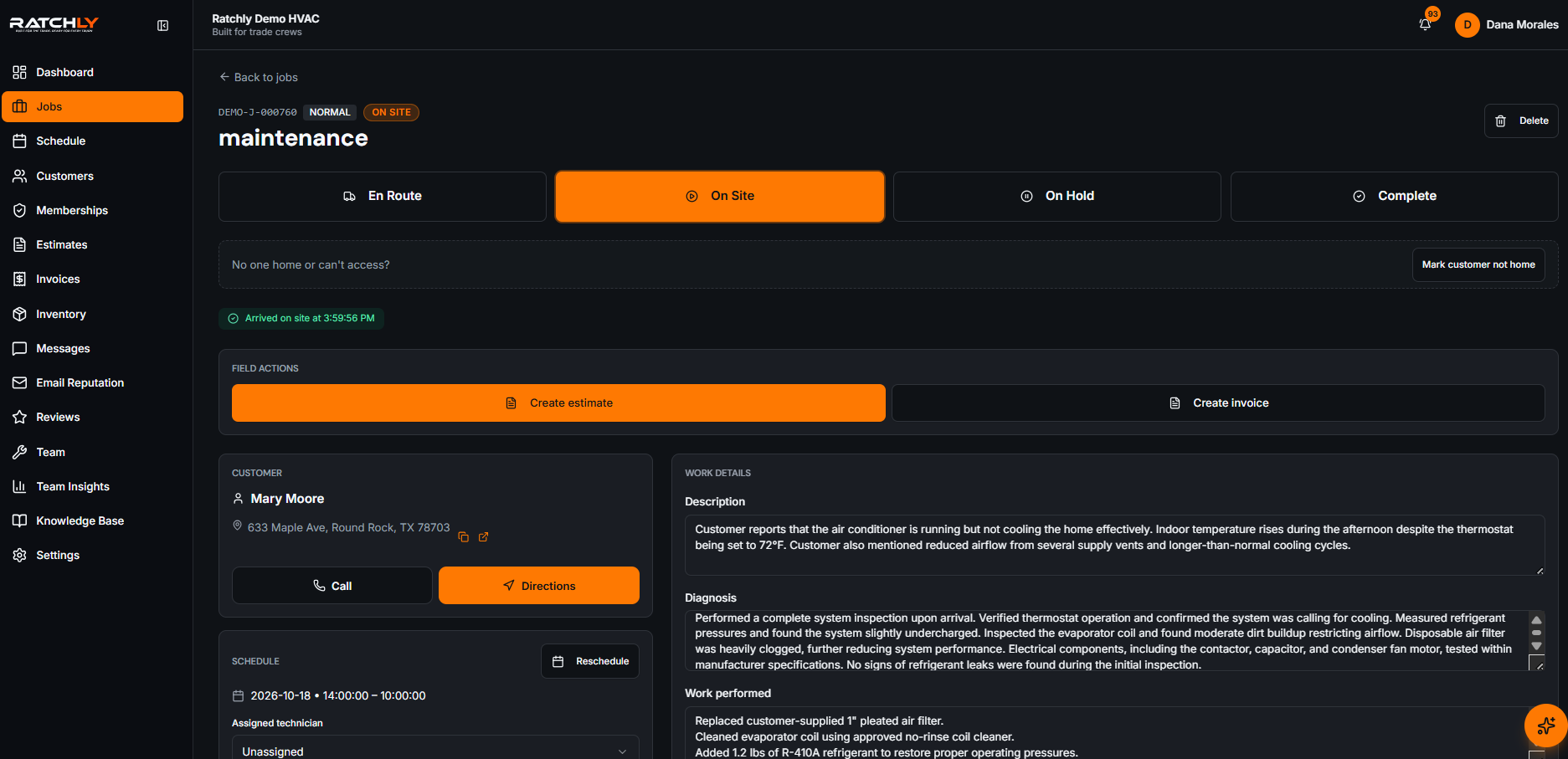
Every job carries its own history
Equipment, prior visits, photos, parts used and refrigerant logged against the unit, not a filing cabinet.
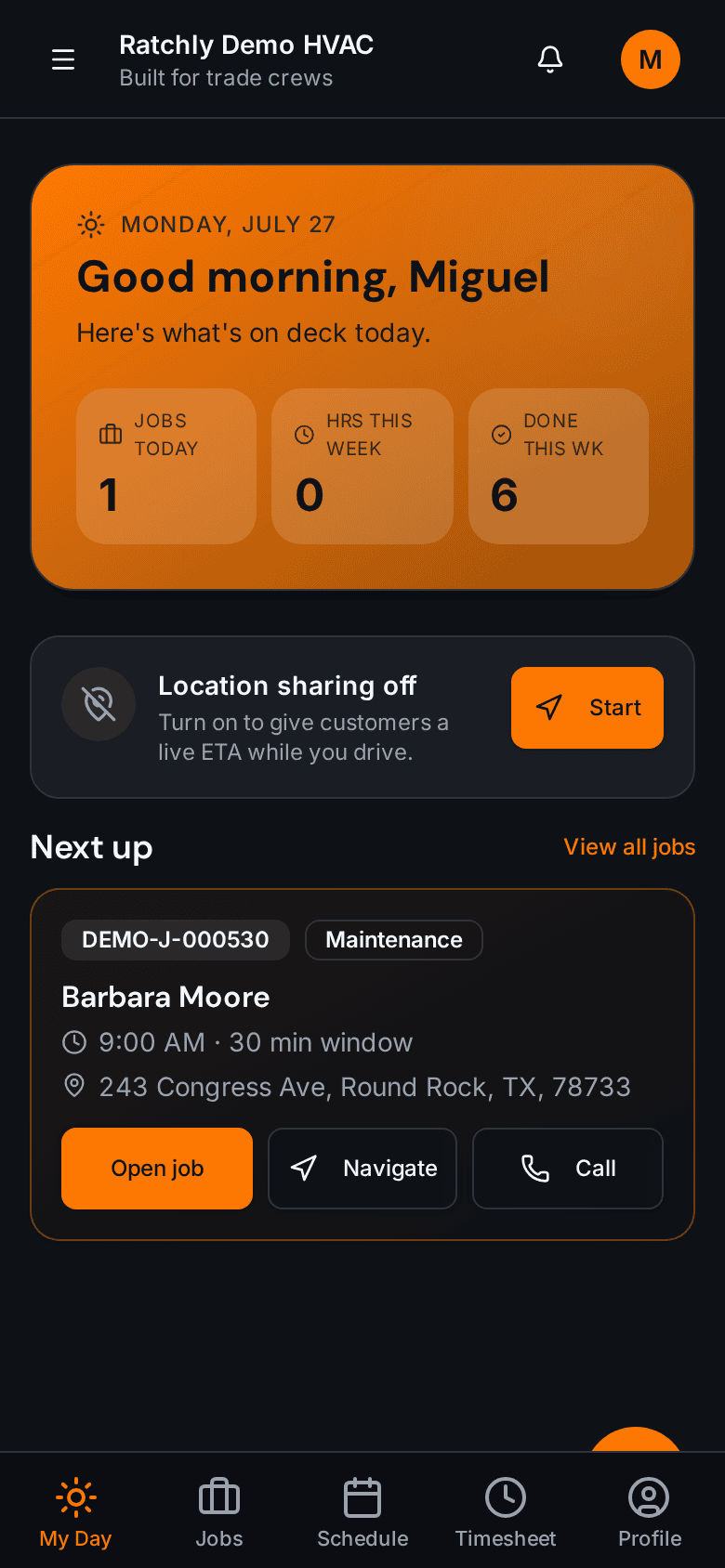
The tech works from a phone
No second app, no laptop in the van. Today's route, job notes, estimate and payment collection in the browser.
A no-cool call, end to end
- 1Call comes in — customer and address autocomplete, prior units already attached.
- 2Job is dropped on the board; Ratchly suggests the tech with the shortest drive.
- 3Customer gets a confirmation text with a 2-hour window and an on-the-way link.
- 4Tech diagnoses, builds a 3-option estimate on the phone, captures the signature.
- 5Approved estimate converts to an invoice; card is taken on site.
- 6Review request goes out automatically the next morning.
What it changes for your shop.
- Stop re-entering the same job in three systems
- Invoice the same day instead of the next weekend
- See revenue, aging and technician load without building a report
- Onboard a new dispatcher in an afternoon
Where shops use it
Owner-operator running the truck and the phone
The dashboard is the office. Book from the van, quote at the curb, take the card before you leave.
Shop with a dispatcher and 4–8 techs
One board for the crew, live status per tech, and a clean handoff between office and field.
Growing shop adding maintenance revenue
Agreements generate their own visits, so recurring revenue stops depending on someone remembering.
HVAC Business Management Software — questions we get asked.
What does HVAC business management software actually do?
It keeps the entire service cycle on one record: customer and equipment history, scheduling, dispatch, technician field notes, estimates and approvals, invoicing, payment collection, maintenance agreements and customer messaging. The point is that finishing one step sets up the next automatically instead of requiring a retype.
How is this different from general field service software?
The workflows assume HVAC: equipment and unit history, refrigerant tracking, seasonal maintenance agreements, diagnostic-then-quote visits, and good/better/best option pricing. Generic field service tools can be bent into that shape, but you spend the first month configuring it.
Do I need to move off my accounting software?
No. Ratchly handles the operational side — jobs, estimates, invoices and payments — and your accountant keeps the books. Invoice and payment data can be exported for reconciliation.
How long does setup take?
Most shops import customers, add their techs and run a first real job the same day. There is no implementation project and no paid onboarding.
Is it usable for a one-truck business?
Yes — that is the smallest size we design for. Single-tech shops use the same board, they just have one lane on it.
Keep reading
HVAC Scheduling Software
A board you can drag, a booking flow that knows where the truck already is, and confirmations the customer actually receives.
Read moreDispatchHVAC Dispatch Software
See where every tech is, what they are on, and who can take the next call — then reassign it by dragging it onto them.
Read moreInvoicing & paymentsHVAC Invoice Software
The invoice is built from the job — parts, labor, refrigerant, agreement discount — and paid at the kitchen table.
Read moreEstimatesHVAC Estimate Software
Good, better, best on the tech's phone. Customer signs on their own screen. Approved estimate becomes an invoice in one tap.
Read moreFieldHVAC Technician App
Techs open a link, add it to the home screen, and have their day, their jobs, their checklists and payment collection in one place.
Read moreOperationsHVAC Job Management Software
Equipment history, checklists, photos, parts, refrigerant, estimate and invoice — all attached to the job, not scattered across four tools.
Read moreCustomer experienceHVAC Customer Portal
Customers confirm, track, approve, pay and request service from one link — no account to create, no password to forget.
Read moreRecurring revenueHVAC Service Contract Software
Agreements generate their own maintenance visits, apply member pricing automatically and flag renewals before they lapse.
Read moreEfficiencyHVAC Route Optimization
Group the day by area, order the stops by real drive time, and re-sequence when an emergency lands — without rebuilding the board.
Read moreReputationHVAC Review Automation
The review request goes out after the job is done and paid — while the customer still remembers the technician's name.
Read moreField serviceHVAC Field Service Software
The field service stack a 1–10 tech HVAC shop actually needs — set up in an afternoon, not a quarter.
Read more