Field service management software coordinates work that happens away from the office: assigning it, tracking it, capturing what was done, billing it and keeping the customer informed. Most platforms in this category are built for fleets of fifty-plus technicians, and their configuration burden reflects that.
Ratchly narrows the scope on purpose. It covers the same operational ground — schedule, dispatch, mobile field work, estimates, invoicing, payments, customer messaging — with defaults that already assume HVAC, so a small shop is running the same day.
Enterprise field service tools cost a quarter to implement.
A shop with four trucks does not have an operations analyst to configure workflows, and cannot afford three months of half-adoption while the crew resists the change.
- Configuration projects that outlast the enthusiasm for them
- Per-seat pricing that punishes seasonal hiring
- Features aimed at fleets of fifty trucks
- Technicians who never adopt the mobile app
- Paid onboarding before you see value
HVAC defaults, not a configuration project.
Equipment history, refrigerant logging, maintenance agreements, diagnostic-then-quote visits and option pricing are already how the product works. You import customers, add techs and run a real job.
Scheduling and dispatch
Live board and map with drag-to-reassign and automatic customer notices.
Mobile field workflow
A phone-installed technician view with checklists, photos, estimates and payment.
Quote to cash
Estimate, signature, invoice and payment on one continuous record.
Customer communication
Confirmations, ETAs, reminders and review requests driven by job status.
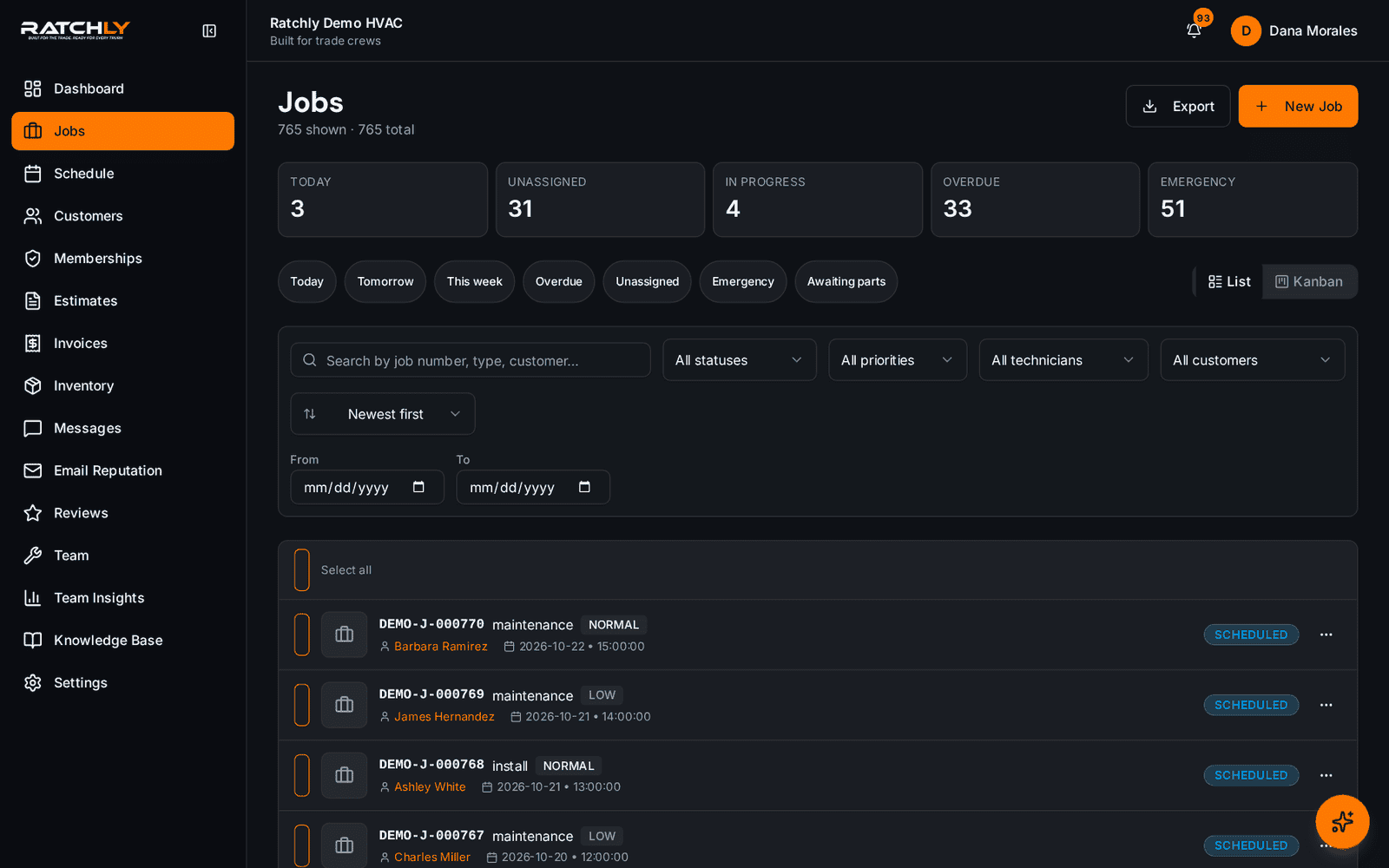
All field work in one board
Unassigned, scheduled, in progress and complete — filterable by technician.
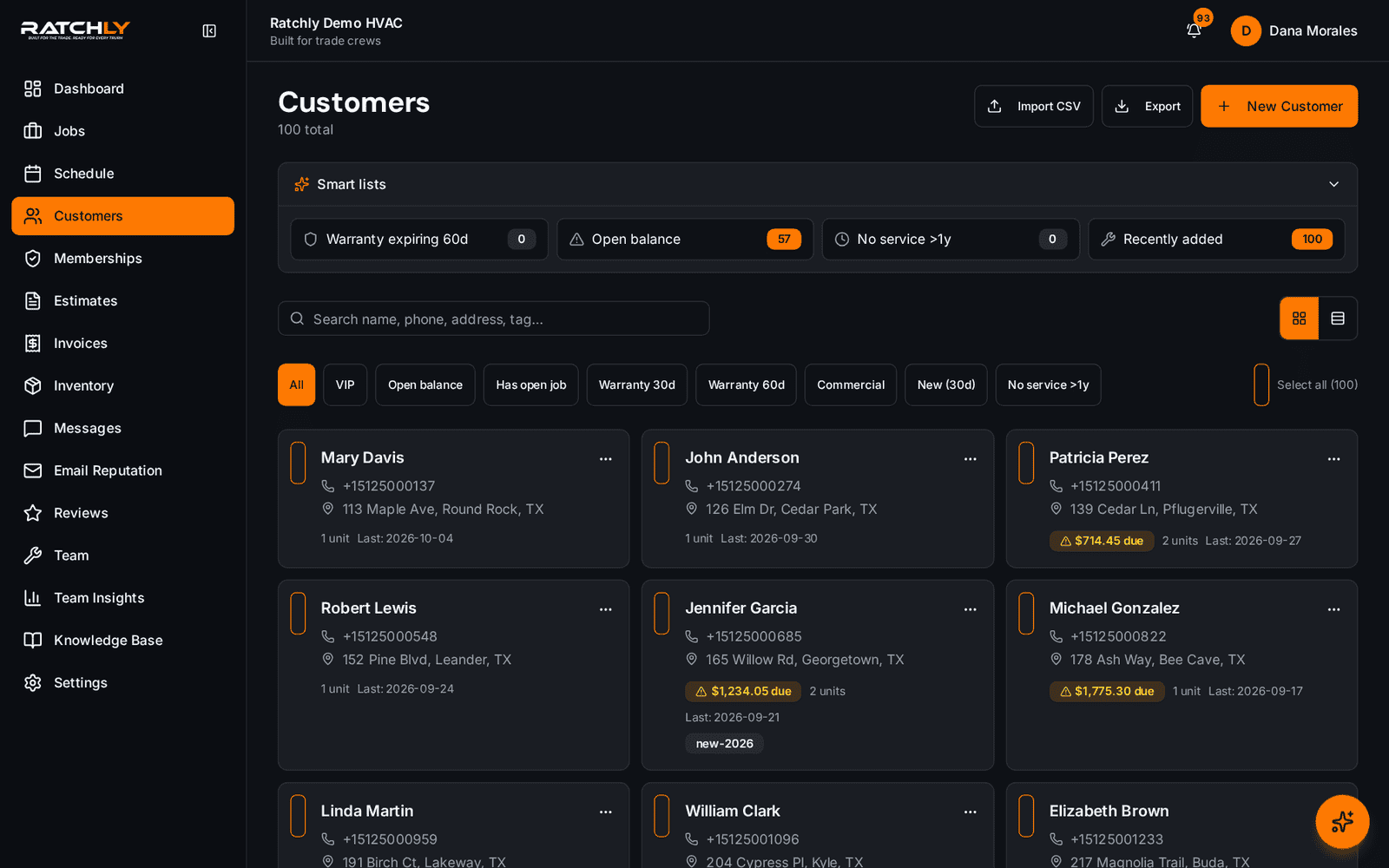
Customer base with full history
Every account, its equipment and its service record in one searchable list.
Switching from paper in one week
- 1Import your customer list.
- 2Add technicians; each installs the field view from their welcome email.
- 3Run live jobs through the board for a week while the old process shadows it.
- 4Turn on automated customer messaging once the crew is comfortable.
What it changes for your shop.
- Operational coverage without an implementation project
- Adoption that survives contact with the crew
- Predictable pricing as you add seasonal help
- One system instead of five subscriptions
Where shops use it
Coming off paper and spreadsheets
The fastest path from whiteboard to a shared live board.
Downsizing from an enterprise platform
Keep the operational workflow, drop the configuration surface you never used.
Residential and light commercial mix
One board handles both, with per-unit history on commercial sites.
HVAC Field Service Software — questions we get asked.
How does HVAC field service software work?
The office books and assigns work on a shared board; the technician receives it on their phone, records what they did, quotes and collects on site; and the system turns that record into an invoice and a customer notification. Everything hangs off one job record.
What should HVAC software include?
At minimum: scheduling and dispatch, a mobile technician workflow, per-unit equipment history, estimates with option pricing, invoicing and payment collection, maintenance agreements, and automated customer messaging. Anything less and you will be running a second tool alongside it.
Is Ratchly a fit for a large contractor?
It is built for roughly one to ten technicians. Above that, shops usually need procurement, inventory depth and reporting that an enterprise platform handles better, and we would rather say so than oversell.
How much does HVAC software cost?
Pricing varies widely across the category, from low per-user monthly plans up to enterprise contracts with implementation fees. Ratchly's current plans and what is included are listed on the pricing page.
Keep reading
HVAC Business Management Software
One system for the whole job: book it, dispatch it, quote it, invoice it, get paid, and ask for the review — without a single spreadsheet.
Read moreOperationsHVAC Job Management Software
Equipment history, checklists, photos, parts, refrigerant, estimate and invoice — all attached to the job, not scattered across four tools.
Read moreFieldHVAC Technician App
Techs open a link, add it to the home screen, and have their day, their jobs, their checklists and payment collection in one place.
Read moreLooking at the bigger picture? See how hvac business management software ties the whole service cycle together.