HVAC scheduling software replaces the whiteboard with a live board every person in the business can see: the dispatcher booking the call, the tech looking at tomorrow, and the customer waiting on a window. The value is not the calendar — it is that moving one job updates the tech, the customer and the invoice trail at the same time.
Ratchly's board is built around what actually breaks a service day: emergency calls that arrive at 10am, a job that runs two hours long, and maintenance visits nobody remembered to place. You drag, it recalculates, and the affected people are told.
The schedule is accurate for about forty minutes each morning.
The board gets built before the first call, then reality happens. Without a shared live view, every change becomes three phone calls and one customer who was never told.
- Techs zig-zag across town because jobs were never grouped
- An emergency bumps the wrong tech and quietly breaks two appointments
- Customers call the office to ask where the tech is
- Recurring maintenance is remembered, not scheduled
- The dispatcher rebuilds the day by hand every morning
Drag a job, and everyone downstream finds out.
Move a job on the Ratchly board and the end time recalculates from the job duration, the technician's day updates on their phone, and the customer gets the new window by text. No side conversations required.
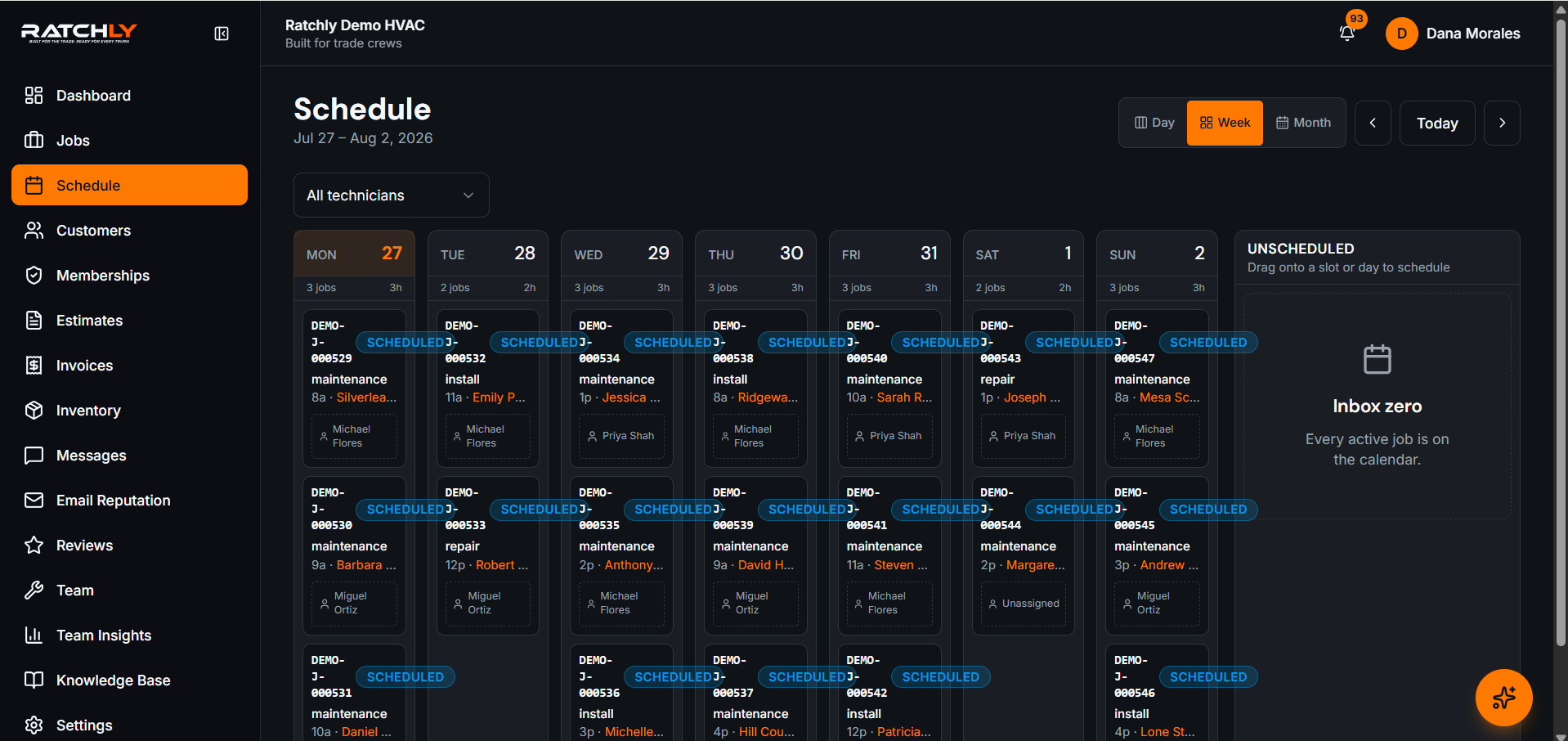
Drag-and-drop across techs and days
Reschedule by moving the card. Duration is preserved and the end time is recalculated server-side.
Drive-time aware suggestions
New jobs are offered to the tech who is already nearby, not the first name on the list.
Recurring maintenance visits
Set quarterly, semi-annual or annual once — the visits place themselves on the board.
Automatic customer confirmations
Booking, reschedule and on-the-way messages send off the job status.
Week view across the whole crew
Filter by technician, service line or status, and spot the gaps that should be sold into.
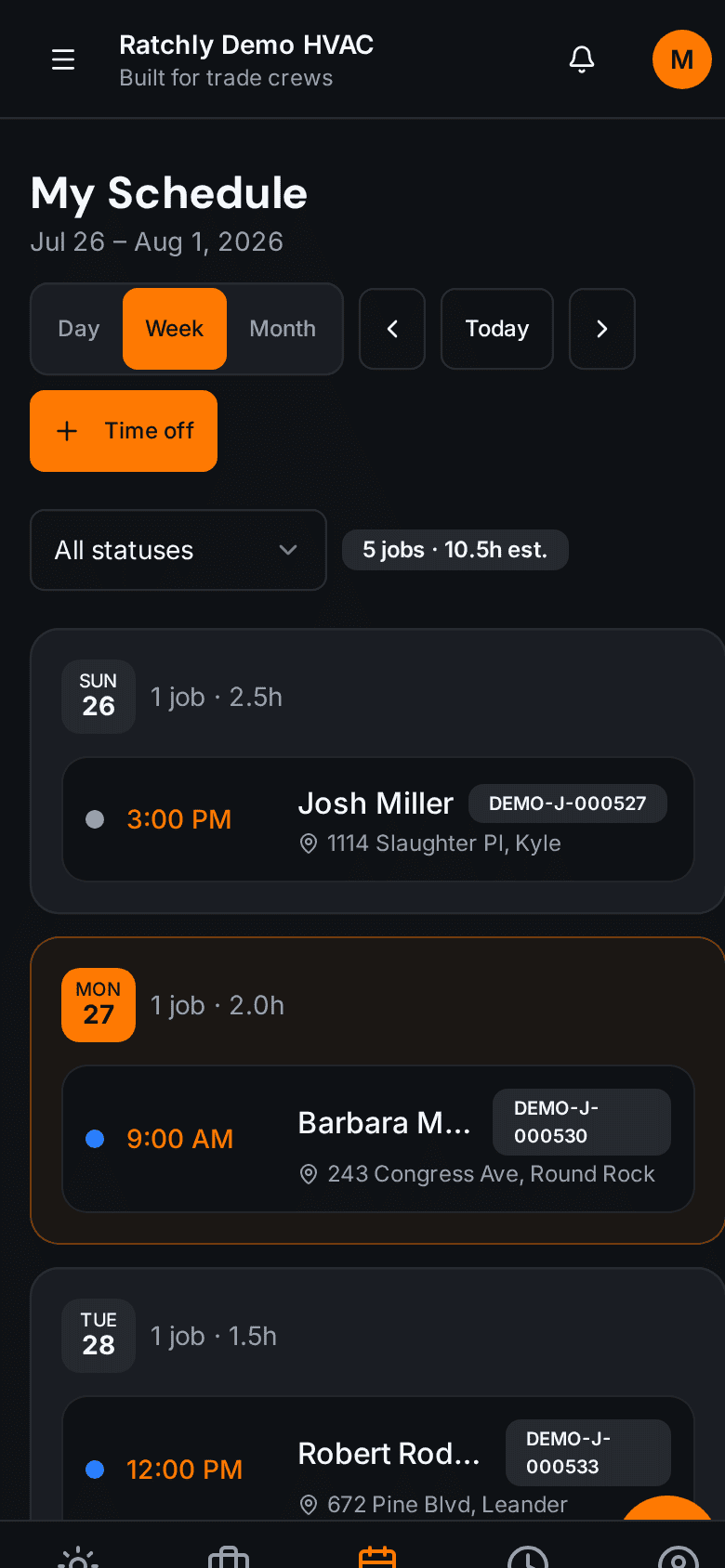
Techs see their own day on a phone
Day, week and month views for the field, with the same data the office sees.
Handling a 10am emergency without wrecking the day
- 1Mark the new call urgent — techs within reach are listed by ETA.
- 2Drop it into the nearest tech's afternoon; the following jobs shift with their real durations.
- 3The bumped customer is automatically texted a new window before they notice.
- 4The tech's phone updates; nobody has to call the van.
What it changes for your shop.
- Fit one to two more paid calls per tech per day
- Cut the morning schedule rebuild to a few minutes
- Fewer 'where is my technician' calls to the office
- Maintenance visits stop slipping out of the season
Where shops use it
Peak-season overflow
In a heat wave the board shows real capacity per tech, so you stop promising slots you cannot serve.
Split residential and install crews
Keep service and install lanes separate on the same board without two calendars.
One-truck shop
Book from the van between calls; the customer confirmation goes out without a second step.
HVAC Scheduling Software — questions we get asked.
What is HVAC scheduling software?
It is a shared, live calendar for service work that ties each appointment to the customer, the equipment, the assigned technician and the job's status — so a change in one place updates everywhere instead of being re-announced by phone.
Can I still schedule everything by hand?
Yes. Ratchly suggests a tech and a slot; you can override any suggestion by dragging the job wherever you want it.
Does it handle recurring maintenance agreements?
Yes. Agreements generate their visits on the board on the correct dates, and the visit carries the agreement's scope with it.
Do customers see the exact appointment time?
Customers get an arrival window; the technician sees the precise slot. That keeps expectations honest when a job runs long.
Will the technicians need a separate app?
No. The field view runs in the phone browser and can be installed to the home screen, so there is nothing to distribute through an app store.
Keep reading
HVAC Business Management Software
One system for the whole job: book it, dispatch it, quote it, invoice it, get paid, and ask for the review — without a single spreadsheet.
Read moreDispatchHVAC Dispatch Software
See where every tech is, what they are on, and who can take the next call — then reassign it by dragging it onto them.
Read moreEfficiencyHVAC Route Optimization
Group the day by area, order the stops by real drive time, and re-sequence when an emergency lands — without rebuilding the board.
Read moreOperationsHVAC Job Management Software
Equipment history, checklists, photos, parts, refrigerant, estimate and invoice — all attached to the job, not scattered across four tools.
Read moreLooking at the bigger picture? See how hvac business management software ties the whole service cycle together.